
UTM parameters for email: the one rule everyone gets wrong
If you take one thing from this guide to utm parameters for email, take this: the medium is always email. Not newsletter, not broadcast, not the name of your tool. Just email.
This matters because utm_medium=newsletter is the single most common email tagging mistake, and it looks completely reasonable. The problem is that Google Analytics does not read utm_medium as a free-text label. It matches it against a fixed list, and its Email rule accepts only email, e-mail, e_mail, or e mail. The word newsletter matches nothing, so a link tagged that way lands in a bucket called Unassigned instead of your Email channel, and quietly vanishes from the report you actually check. "Newsletter" is a perfectly good utm_source. It is never the medium.
The values that actually work
Here is the whole correct set for an email link. Medium stays email every time; only the source and campaign change.
| Parameter | What to put | Example |
|---|---|---|
utm_source | The specific email or list | newsletter, cold_email |
utm_medium | Always email | email |
utm_campaign | The specific send | march_digest |
utm_content | Which link, if several | header_cta, footer_link |
So a real email tracking link for your March newsletter looks like this:
https://yoursaas.com/pricing?utm_source=newsletter&utm_medium=email&utm_campaign=march_digest
You can build that by hand or let a builder assemble it from the email channel so the medium is correct automatically.
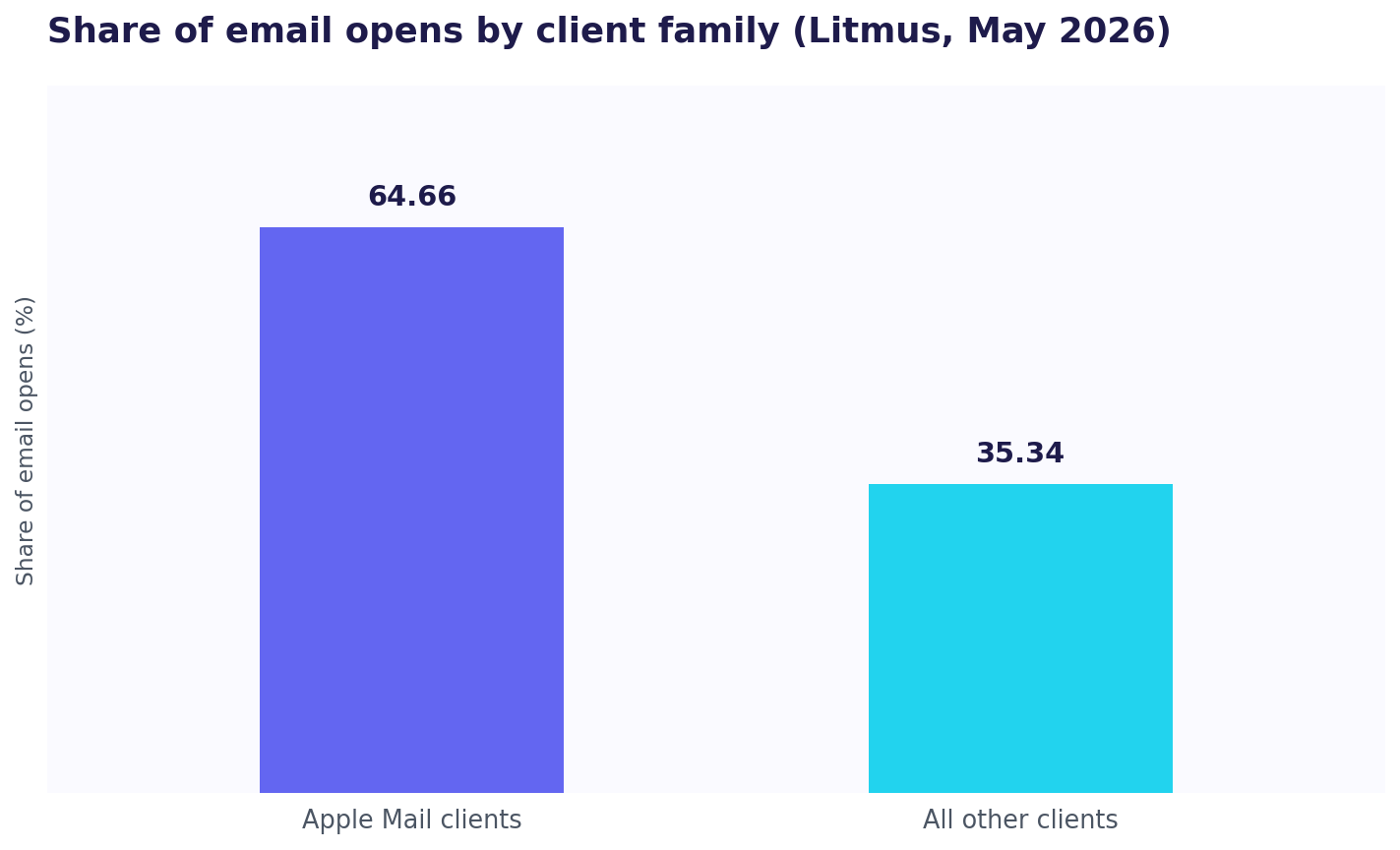
Tagging the links this way matters more than it used to, because the other half of email tracking has quietly broken. Open rates, the classic email metric, are now largely unreliable: Apple's Mail Privacy Protection pre-loads images for users who enable it, which fakes an open whether or not anyone read the message. Litmus, which measures email opens across billions of messages, reports that Apple mail clients account for 64.66% of all opens as of May 2026, and that Mail Privacy Protection now affects roughly 55 to 60% of opens (Litmus). In other words, more than half your open data is guesswork. A click on a properly tagged link is a real action a real person took, which makes link tracking the part of email analytics you can still trust. If you want the reasoning behind which value goes where, source versus medium covers it, and the full examples sheet has ready versions for every channel, not just email.
Why your email link loses its UTMs or doubles up
Two things go wrong often enough to be worth naming, and both have clean fixes.
Your email tool is already tagging for you. Many email platforms, Mailchimp among them, automatically append their own UTM parameters to every link. If you then also add your own by hand, you double-tag: the link ends up with two sets of parameters, sometimes conflicting, and your reports get messy. The fix is simple: pick one. Either let the platform tag and accept its naming, or turn its auto-tagging off and tag by hand. Never both.
A redirect strips the parameters. If a link wrapper or redirect in the middle drops the query string, your UTMs never reach the destination. Most link shorteners actually preserve them, so this is not a blanket rule, but a misconfigured redirect can lose them. Send yourself a test copy and click the real link once before the campaign goes out.
Long links, and the shortener question
A fully tagged email link is long. In a designed newsletter with buttons, nobody sees the URL, so it does not matter. In a plain-text or personal email, that sprawling string is visible and looks like spam.
This is where a utm link shortener earns its place. Shortening the tagged URL gives you a clean link to paste, and because a shortener redirects to the full tagged destination, the UTM parameters still arrive at your site. The one caveat is the same as above: some redirects drop parameters, so confirm your shortener passes them through by testing the short link once. A good one carries every UTM straight to the end.
Never put the person in the link
Here is the mistake that matters most, especially in cold outreach. It is tempting to jam the recipient's email address or name into a utm_ value so you can tell exactly who clicked. Do not do this.
A UTM value is not private. It shows up in server logs, in browser history, and in the referrer header the browser passes to the next site. Put someone's email address in there and you have leaked it into all of those places. Worse, link scanners and spam filters increasingly distrust personalised URLs, so it can hurt your deliverability, and addresses sitting in URLs get scraped. You would be trading a small tracking convenience for a real privacy and deliverability problem.
There is a correct way to know which individual clicked: a per-person token that only your own system can resolve, one that can expire and be revoked, and that exposes nothing if someone else sees it. That is exactly what ScoutVibe's per-person links do. You get the "who opened it" answer that a UTM cannot safely give you, without putting anyone's address in a URL.
Putting a recipient's email in a link to see who clicked leaks it and hurts deliverability. ScoutVibe gives you a per-person link that only your account can resolve, shows you exactly who opened it and what they did next, and exposes nothing if the link is forwarded. The free tier covers your next campaign.
Try ScoutVibeFAQ
What source and medium should I use for email and newsletter links?
Set utm_medium=email every time, for both newsletters and one-to-one emails. Use utm_source for the specific email or list, like newsletter or cold_email, and utm_campaign for the specific send, like march_digest. The mistake to avoid is utm_medium=newsletter: newsletter is a fine source, but as a medium it matches none of Google's rules and your traffic lands in Unassigned.
Why does my email tracking link sometimes lose its UTMs or double up?
Two usual causes. Your email platform may auto-append its own UTMs, so if you also tag by hand you get duplicate, conflicting parameters. Pick one method, not both. The other cause is a redirect or wrapper that strips the query string before the click lands. Most shorteners preserve UTMs, but send yourself a test and click the real link once before sending.
Should I put anything about the specific recipient in the link?
No. Never put an email address or name in a UTM value. It leaks into server logs, browser history and referrer headers, it can hurt deliverability because scanners distrust personalised URLs, and it gets scraped. To know which individual clicked, use a per-person token that only your system can resolve and that can be revoked, not a UTM parameter anyone can read.