
What a UTM parameter actually is
You post your launch link in three places on one afternoon: a Slack community, a Discord server, and one subreddit. Two days later nine people have signed up. You open your analytics, and there is a single row waiting for you. Direct. Nine visits. No source.
A UTM parameter is what fixes that. It is a short label you add to the end of a link. The label changes nothing about the page a visitor lands on. It exists so your analytics can sort people by where they came from, instead of piling them into one anonymous heap.
The name is easily the most confusing thing about them. UTM stands for Urchin Tracking Module, after Urchin), the analytics product Google bought in April 2005 and rebuilt into Google Analytics. Google stopped selling Urchin in 2012. The name outlived the product by more than a decade. So if you have been trying to decode the letters, that is all there is: a leftover brand, not a concept you need to understand. The word "code" in "tracking code" trips people up the same way; it is not actually code either. (The full Urchin story is the reason those three letters are impossible to guess.)
What a UTM in a URL looks like
Here is one link, written twice. Both send the visitor to exactly the same page.
Plain:
https://yoursaas.com/pricing
Tagged:
https://yoursaas.com/pricing?utm_source=reddit&utm_medium=social&utm_campaign=launch_week
The structure is simpler than it looks. Everything before the question mark is the real address. The question mark means "extra information follows". After it come pairs, each written as name=value. An ampersand, the & symbol, separates one pair from the next.
So that tagged link carries three facts: the visitor came from reddit, through a social channel, during the launch_week push. Your analytics reads those three labels and files the visit accordingly.
If the shape was all you came for, stop here and go build one in our free UTM builder. The rest of this is about why it is worth the ten seconds.
What happens when you don't tag a link
Most people assume an untagged link still tells you something. Usually it tells you nothing.
In April 2023 SparkToro published research with Really Good Data that measured this directly. They tracked 1,113 visits across 16 URLs on 11 networks over ten days, using around 100 recruited participants. Then they checked what each platform actually passed along.
The finding matters most for anyone who shares links by hand. Every single visit from TikTok, Slack, Discord, Mastodon and WhatsApp arrived with no source information at all. All of it recorded as direct. Facebook Messenger lost 75 percent. Instagram DMs lost 30 percent. Even public LinkedIn posts lost 14 percent, and Pinterest 12 percent. Email was not part of the test, so treat it as unmeasured rather than safe.
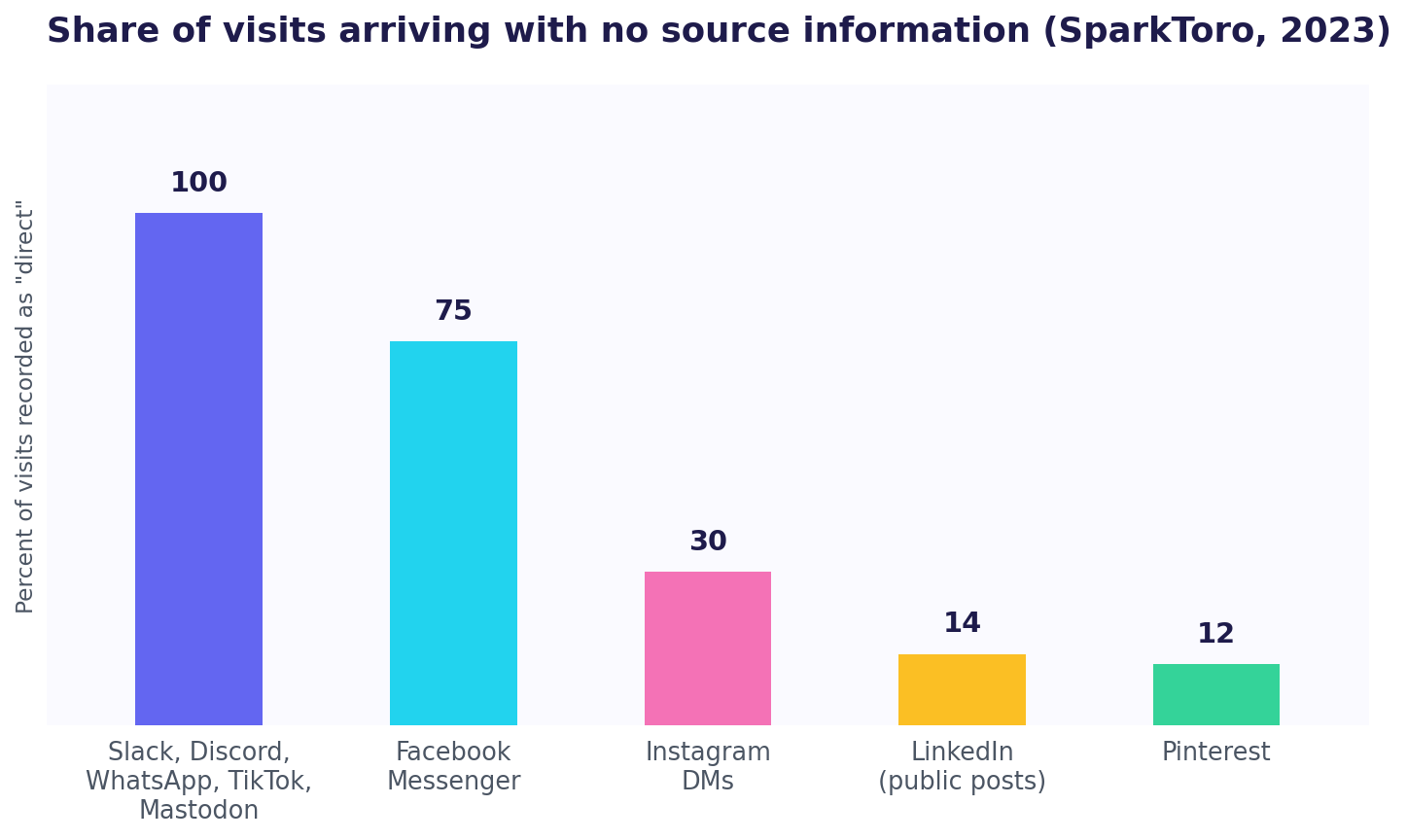
Now go back to that afternoon. Untagged, the Slack post and the Discord post are both completely invisible. They are not weakly attributed, they are gone. Your nine signups sit in one row that tells you nothing you can act on.
Here is the real cost. Next launch, you decide where to post based on a number that does not distinguish between the community that sent eight people and the one that sent none. So you guess, and there is a good chance you spend your effort on the wrong one. Tagging the three links beforehand takes about thirty seconds and removes the guess entirely.
Which parameters you actually need
Google is unusually direct about this. Its documentation states plainly that "when you add parameters to a URL, you should always use utm_source, utm_medium, and utm_campaign" (Analytics Help).
Nine are documented in total. You will never touch most of them.
| Parameter | Question it answers | Do you need it? |
|---|---|---|
utm_source | Which specific site, list or community? | Yes, always |
utm_medium | What kind of channel is it? | Yes, Google recommends it |
utm_campaign | Which push does this belong to? | Yes, Google recommends it |
utm_id | Which record in another system? | Only if you reconcile with another tool |
utm_source_platform | Which platform sent the traffic? | Rarely, mostly ad platforms |
utm_term | Which paid keyword? | Only if you run paid search |
utm_content | Which of two links in one campaign? | Only when testing two versions |
utm_creative_format | What type of creative? | No, documented but not currently reported |
utm_marketing_tactic | What targeting was used? | No, documented but not currently reported |
If you are posting in communities rather than buying ads, utm_source alone gets you most of the value on that table. Add medium and campaign once you have enough links that grouping them helps. If you are not sure which value belongs in which field, utm_source vs utm_medium vs utm_campaign vs utm_content takes all four apart with a worked example. Resist filling in utm_term and utm_content just because the fields exist. A link carrying five labels you never read is not better data. It is just a longer link.
Two mistakes that quietly ruin the data
Inconsistent capitals. Google's own documentation is explicit: "Parameter values are case sensitive, e.g. utm_source=google is different from utm_source=Google." Tag one post Reddit and the next reddit, and your report splits one real channel into two half-sized rows. Neither looks worth repeating. Pick lowercase and never deviate. Our UTM builder forces it for you, which is one less thing to remember.
Tagging your own internal links. UTMs exist for traffic arriving from somewhere else, not for links between your own pages. Tag an internal link and you corrupt the record of where that visitor really came from. Analytics Mania documents one way this bites in GA4: the tagged value can be inherited by that person's next visit, so a stale campaign name keeps collecting credit it did not earn. Only tag links that live somewhere other than your own site.
Neither mistake is hard to avoid once tagging is a habit. The honest question is whether it is one yet.
When you share your product link somewhere, do you tag it first?
What a tagged link cannot tell you
A UTM answers one question well: which channel. It does not tell you which person, and it says nothing about what they did after they landed.
For most of what marketing writing assumes, that is fine. For a solo builder in the first months, it often is not. You are not balancing spend across six channels. You are trying to work out whether the founder you emailed on Tuesday actually opened the pricing page, and where people quietly give up before signing up. A utm_source value cannot answer either question, no matter how carefully you name it.
That is the gap worth closing once tagging is a habit. When you are ready to build tagged links faster, see our roundup of the best tracking link generators. And for the whole subject end to end, this article is part of our complete guide to UTM and link tracking.
If you want to know which of those nine signups came from Discord, and what each of them actually looked at before deciding, that is what ScoutVibe does: one link per community or per person, and the real path each visitor took through your site. The free tier covers your first launch.
Try ScoutVibeFAQ
What is a UTM parameter, and what does one actually look like in a URL?
It is a label added to the end of a link so analytics can record where a visitor came from. In a URL it appears after a question mark as a name=value pair, with & between pairs, like ?utm_source=reddit&utm_medium=social. The page the visitor sees is unchanged.
Why bother tagging a link at all, and what happens if I don't?
Because untagged links from private and app-based channels usually arrive with no source at all. SparkToro's 2023 research found every visit from Slack, Discord, WhatsApp, TikTok and Mastodon was recorded as direct. Without a tag you cannot tell which community actually sent you the people who signed up.
Which parameters do I actually need, and which can I ignore?
Google says always use utm_source, utm_medium and utm_campaign. In practice utm_source carries most of the value if you post in communities rather than run ads. Skip utm_term and utm_content unless you run paid search or test two versions of a link. Skip utm_creative_format and utm_marketing_tactic entirely, since Google documents them but does not currently report them.