
Every link you share is a question you could be answering: did this work? Post a link in an email, a community, or an ad, and without tracking you only know that traffic arrived, not that it arrived because of that link. UTM and link tracking is how you close that loop, turning "we got some visitors this week" into "the launch email drove 340 clicks and 12 signups, and the Reddit post drove noise." This guide is the complete reference for both: what UTMs are, how link tracking actually works, why so much of your traffic is misattributed without it, and how to build a tracking habit that a team of one can maintain.
It is long on purpose, so use it as a reference. Read it through once to get the whole model, then return to the section you need. Wherever a topic deserves its own deep dive, we link to a focused guide so this page stays readable.
What UTM and link tracking actually is
Two related ideas sit under this heading, and it helps to separate them.
UTM tracking means adding small tags to a URL, called UTM parameters, that tell your analytics where a visit came from. When someone clicks a tagged link and lands on your site, your analytics reads those tags and files the visit under the right source and campaign. The link still points at your normal page; the tags just travel along with it. We break the tags down fully in what UTM parameters are.
Link tracking is the broader practice of knowing what happens to a link you share: how many clicked, from where, on what device, and sometimes which specific person. It includes UTMs, but also short links that count clicks on their own dashboard, and per-person links that tie a click to a known individual.
Put simply: UTMs tell your analytics the source of a visit, and link tracking tells you about the link itself. Most complete setups use both, because they answer different halves of the same question.
A short history of why UTMs exist
The "UTM" in UTM parameters stands for Urchin Tracking Module, named after Urchin, the analytics company Google bought in 2005 and turned into Google Analytics. The tags predate that acquisition and survived it, which is why a convention from the early 2000s still runs the modern web: every major analytics tool reads the same five parameters. That shared standard is the quiet reason link tracking works at all. Because utm_source means the same thing everywhere, a link you tag once is understood by Google Analytics, by privacy-first tools, and by most shorteners without any extra setup. You are not adopting one vendor's system; you are using a lingua franca that the whole industry already speaks. It is worth knowing this because it explains why UTMs are worth learning properly once: the skill transfers to every tool you will ever use, and it is not going away.
Why it matters more than it looks
Tracking links is not busywork. It is how you learn which of your efforts actually move the needle, and the cost of not doing it is real money spent on channels you cannot evaluate.
Start with email, still one of the highest-return channels there is. Litmus reports that email marketing drives an ROI of $36 for every dollar spent, higher than any other channel. But that return is only visible if the links in your emails are tagged, otherwise every click lands in your analytics as anonymous "direct" traffic and the channel that earns the most gets credited with nothing. Tagging email links with UTM parameters for email is the difference between proving email's value and guessing at it.
The misattribution problem is bigger than most people realize. In a now-famous 2014 experiment, Groupon de-indexed itself from Google and found that up to 60 percent of its "direct" traffic was actually organic search that analytics had misfiled, because the referrer information was missing. That is the core lesson of link tracking: when a visit arrives without a recorded source, analytics does not leave it blank, it dumps it into "direct," and your real sources silently lose the credit they earned.
And a huge share of sharing now happens where no referrer survives at all. The phenomenon called dark social, sharing through messaging apps, email, and copy-paste rather than public posts, strips the referrer entirely, so those visits also land as "direct." Estimates vary, but analyses consistently put the majority of content sharing in these private channels, which means without tagged links a large part of your word-of-mouth is invisible. The only reliable fix is to put the tracking inside the link before you share it, so the source travels with the click instead of depending on a referrer that may never arrive.
The anatomy of a UTM link
A UTM link is your normal URL with tags added after a question mark. There are five parameters, and three of them do almost all the work. Here is the full set:
| Parameter | What it records | Example |
|---|---|---|
| utm_source | Where the visit came from | newsletter, reddit, twitter |
| utm_medium | The type of channel | email, social, cpc |
| utm_campaign | The specific campaign | spring-launch |
| utm_term | Paid keyword (optional) | project-tracking |
| utm_content | Which link or variant (optional) | header-button |
So a tagged link looks like yoursite.com/pricing?utm_source=newsletter&utm_medium=email&utm_campaign=spring-launch. The visitor still lands on your pricing page; the tags just tell your analytics how they got there. Source, medium, and campaign are the three you should always set. We cover the distinctions that trip people up in utm_source vs medium vs campaign vs content, what the acronym itself means in what UTM stands for, and the underlying format in what a UTM tracking code is. For copy-paste-ready patterns, see tracking URL examples.
Campaign naming that scales
The single skill that separates useful UTM data from a messy report is a naming system you actually follow. Analytics treats every distinct spelling as a distinct source, so discipline here matters more than any tool. A workable system has three rules.
First, lowercase everything, always. Email and email are two channels to your analytics, and the only way to never mix them is to never use capitals. Second, fix a fixed vocabulary for medium, the small set of channel types you actually use, such as email, social, cpc, referral, and never invent a synonym on the fly. Medium is the field that benefits most from a short controlled list, because it is what rolls your dozens of sources up into a handful of channels you can compare. Third, make campaign names describe the campaign, not the date you happened to send it: spring-sale-2026 reads clearly in a report next year; campaign-3 does not.
The payoff compounds. When source and medium are consistent, your analytics can group months of activity into clean channel comparisons, and you can finally answer "which channel actually drives signups" instead of squinting at fifteen near-duplicate rows. When they are inconsistent, no tool can fix it after the fact, because the tool cannot know that Newsletter, newsletter, and news-letter were all meant to be the same thing. Write the convention down, share it with anyone who tags a link, and let a generator enforce it.
How link tracking actually works
Whether the tracking rides in UTM tags or in a short link, the mechanism comes down to the same idea: the tracking has to be built into the link before you share it, because a plain link reports nothing on its own. We cover that principle in what makes a link trackable.
There are two common ways it works. With UTM tags, the tracking is passive: the tags sit in the URL, and your analytics tool reads them when the visit lands. Nothing intercepts the click; the data appears in your own analytics. With a short link or redirect, the tracking is active: the link points at the tracking service first, which logs the click and then forwards the visitor to the real destination. That redirect step is where the click count comes from, and it is how a redirect gets tracked. The two combine cleanly: you can shorten a UTM-tagged link, and the short link both counts the click and passes the tags through to your analytics.
Three ways to make a link trackable
There are really three tools in the box, and they answer different questions:
- UTM tags tell your existing analytics the source of a visit. Best when you already run analytics and want channel attribution. Free, and the tags live in the URL.
- Short links with click tracking create a branded, shortened link and count the clicks on their own dashboard, independent of your site analytics. Best for a clean shareable link plus its own numbers. We explain one of the best-known in how Bitly link tracking works.
- Per-person links issue a unique link to one known individual, so the click ties back to a specific person rather than an anonymous crowd. Best for one-to-one outreach, covered in unique tracking links per person.
Most teams start with UTMs, add a shortener when they want tidy links and click counts, and reach for per-person links when the individual, not the aggregate, is what matters.
Why untagged traffic disappears into "direct"
It is worth dwelling on the failure mode, because it is the single strongest argument for disciplined tagging. When a visit arrives, analytics tries to determine its source from the referrer, the page the click came from. But the referrer is missing more often than you would think: links opened from a messaging app, an email client, a PDF, or a pasted URL usually carry no referrer, and a switch from a secure to a non-secure page drops it too. When the referrer is gone, analytics has nowhere to file the visit, so it becomes "direct / none."
That bucket, often called dark traffic, quietly steals credit from your real work. The Groupon experiment showed it can be a majority of what looks like direct traffic. UTM tags solve this because the source is written into the link itself, so it survives even when the referrer does not. A tagged link that a friend copies into a WhatsApp message still tells your analytics it came from your newsletter campaign. That is the whole point: you stop depending on a referrer that may never arrive and put the source where it cannot be lost.
Building clean tracking links
A tracking link is only as good as the consistency behind it. The most common way UTM data turns to noise is inconsistent naming: newsletter, Newsletter, and email-news are three different sources to your analytics, even though you meant one. A few habits keep the data readable:
- Fix a convention and reuse it. Lowercase everything, pick one word per source, and write it down so you and any teammate tag the same way every time.
- Keep campaign names meaningful.
spring-launchtells you more in a report six months later thancampaign1. - Tag the destination, then shorten. Build the full tagged URL first, then shorten the result, so the short link still carries the parameters.
- Test each link once. Click your own link and confirm it lands correctly and shows up in analytics. A typo in a parameter is invisible until you check.
You can build tagged links by hand, but a generator saves errors. Google's free Campaign URL Builder is the standard, and we built a free UTM builder of our own that works the same way. For the fuller field of tools, see the best tracking link generators.
Reading the data back
Tagging is only half the loop; you also have to read the results. In Google Analytics, tagged visits show up in the traffic and campaign reports, and knowing where to look is its own small skill, which we walk through in finding UTM data in Google Analytics. The practical habit is to check, per campaign, not just clicks but what happened after: did the tagged traffic sign up, or just bounce. A link that drives lots of clicks and no conversions is telling you something useful, and you can only see it if the link was tagged in the first place.
One nuance worth knowing: UTM tags also work on links between your own pages, but tagging internal links can reset the session and distort your reports if you are not careful. We cover when it helps and when it hurts in UTM tags on internal links.
Attribution: which link gets the credit
Once you are tracking links, you face the question of attribution: when a visitor clicks several of your links across several visits before converting, which one gets the credit? The simplest and most common model is last-click, where whatever brought the final visit takes all the credit. It is easy and it is also misleading, because it ignores the email that first brought someone in and the blog post that kept them warm. Given how long and multi-touch real journeys are, last-click systematically flatters your bottom-of-funnel channels and starves the top.
For a small team, the answer is not an elaborate attribution model, it is clean inputs. Tag every link consistently so that each touch is at least recorded, and then look at the whole sequence rather than only the last step. Even a simple habit, noticing that most converters saw the newsletter at some point even when search closed the deal, is more honest than trusting last-click blindly. The enemy is never having tagged the earlier touches at all, because a touch you did not record cannot be credited by any model, sophisticated or simple. Attribution is a reason to tag more thoroughly, not a reason to buy expensive software.
Short links, click tracking, and the tools
Short links do more than tidy a long URL. A good shortener counts every click, shows geography and device, and lets you brand the link on your own domain so it markets you rather than a generic service. The depth varies a lot: some free plans give a bare click count, some give full analytics, and a few keep no history at all. We compare the field across several angles, the best link tracking software for the full picture, the best free link trackers if budget is the constraint, and the best URL shorteners with click tracking if a shortener is specifically what you want.
Your click counts include a lot of robots
Before you celebrate a click number, know that a large share of it may not be human. According to Imperva's 2024 Bad Bot Report, bots made up 49.6 percent of all internet traffic in 2023, split into 32 percent bad bots and the rest automated crawlers, with humans at just 50.4 percent. Bots click links too, especially links posted publicly, so a raw click count on a shared link overstates real interested people. Good link tools filter obvious bots, but none is perfect.
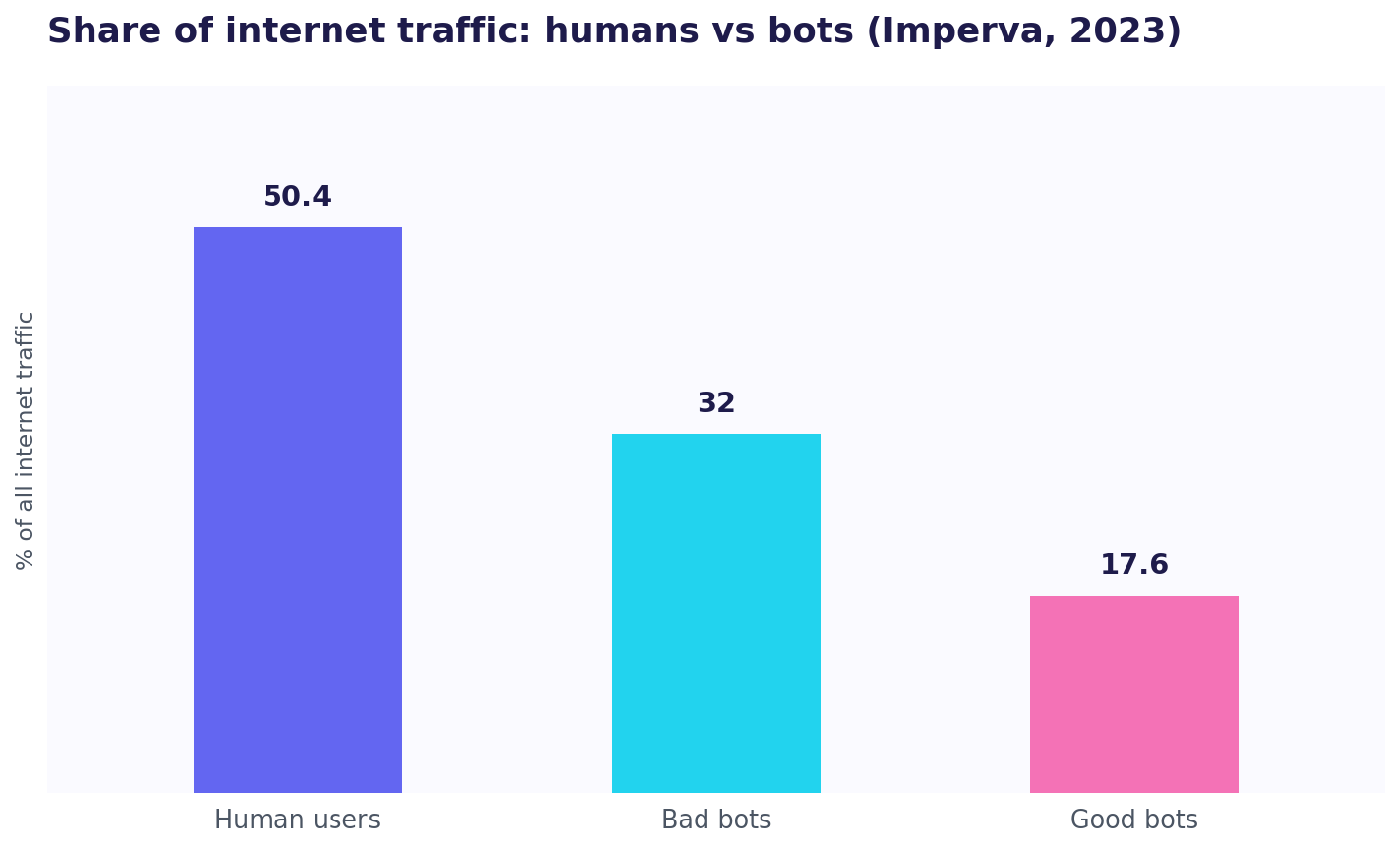
The takeaway is the same as everywhere in tracking: judge trends, not absolute counts. A link that consistently outperforms another is a real signal even if both numbers include some bot noise. Chasing the exact human count of a single link is a losing game; comparing links against each other under the same conditions is where the truth is.
Where your links get opened
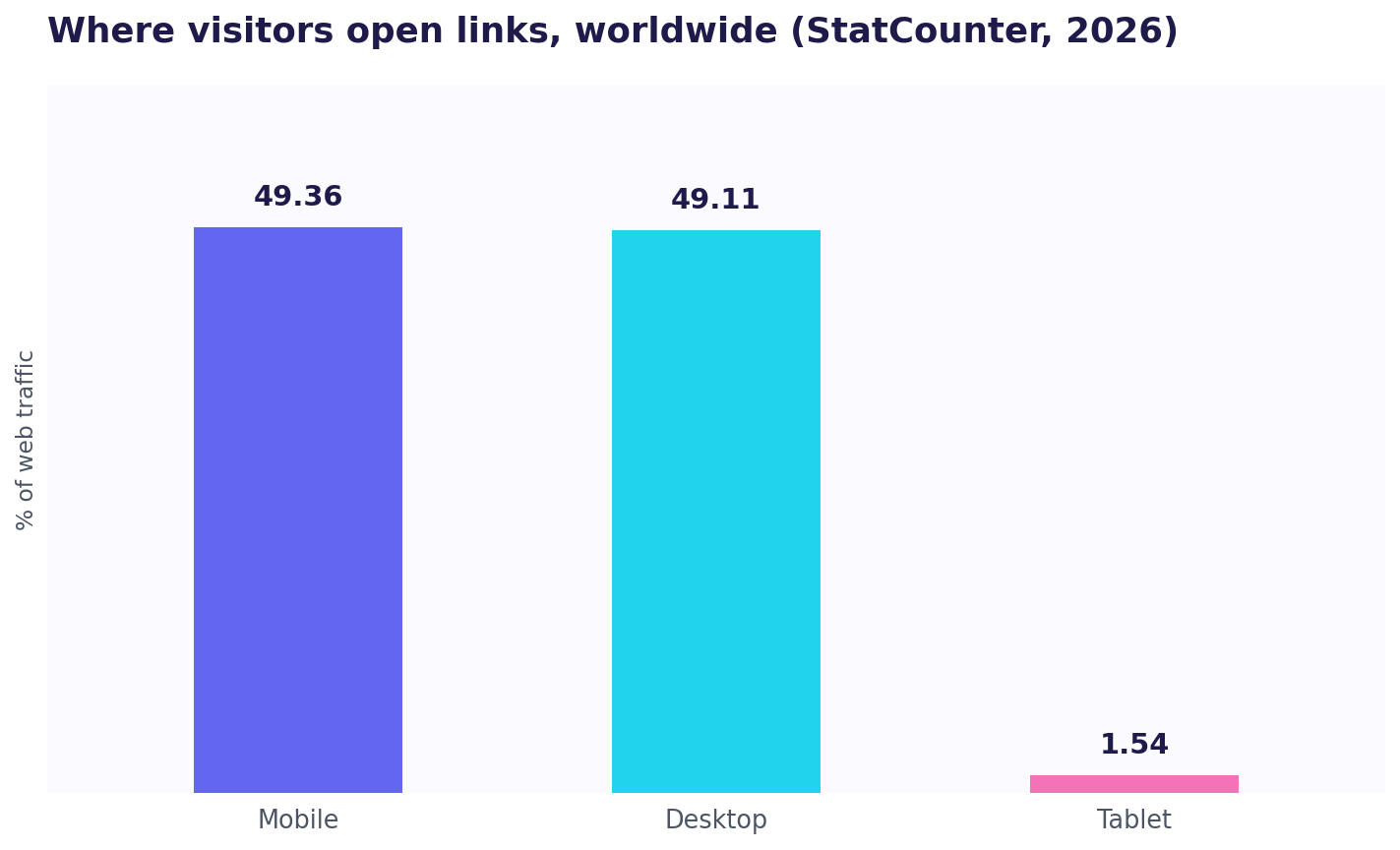
How you build and check links should account for where they are opened, and increasingly that is a phone. Worldwide, StatCounter puts mobile at 49.36 percent and desktop at 49.11 percent of web traffic, with tablets making up the small remainder. So roughly half your clicks happen on mobile, where a long, cluttered UTM-tagged URL looks especially spammy in a message, which is one more reason to shorten tagged links before sharing them, and to make sure whatever the link lands on works on a small screen.
Tracking offline-to-online with QR codes
Link tracking is not only for the web. A QR code is just a link in visual form, so you can put a tagged, trackable link on a business card, a conference booth, a product package, or a printed flyer, and measure how many people scanned it. Encode a UTM-tagged URL, or a short link, into the QR code, and every scan is recorded the same way a click would be, which finally lets you answer the classic question of whether a physical touchpoint drove any online action. The mechanics are identical to any other tracked link: the tracking is built into the destination before you generate the code, so the scan carries its source with it. This is where a shortener earns its keep for print, because you can reprint or redirect the destination without reprinting the code, and because a short link makes a cleaner, more scannable QR than a long tagged URL. For events and offline campaigns, a tagged QR code is the bridge that connects a real-world moment to your analytics.
Privacy and UTM tracking
A reassuring point: UTM parameters are not cookies and do not, by themselves, identify a person. They describe the campaign a click came from, not the individual who clicked, so basic UTM tracking is far less privacy-sensitive than cookie-based tracking and generally does not itself trigger a consent banner. That said, the analytics tool the tags feed may set cookies of its own, and if you combine link tracking with anything that identifies a specific person, you are back in personal-data territory and owe the visitor transparency and, where required, consent. The clean approach is to keep aggregate link tracking aggregate, and to do identified, per-person tracking only with people you have a relationship with and, where appropriate, their consent.
This guide explains how tracking generally works; it is not legal advice. Privacy rules vary by country and by how your specific tools are configured, so confirm your setup against your jurisdiction before relying on it.
UTM tracking versus cookie tracking
People often lump UTMs together with cookies as "tracking," but they are different things and the distinction matters for both accuracy and privacy. A cookie is a small file stored in the visitor's browser that lets a tool recognize the same browser over time; it is what powers returning-visitor counts and much of cross-site ad targeting, and it is what cookie-consent banners are about. A UTM parameter stores nothing on the visitor's device at all. It is just text in the link that describes where the click came from, read once when the visit lands and then done.
That difference has two practical consequences. On accuracy, UTMs do not depend on the browser accepting or keeping anything, so they survive cookie-blocking and privacy modes that break cookie-based tracking, which is part of why tag-your-links is such durable advice. On privacy, because a UTM describes a campaign rather than a person and saves nothing to the device, basic UTM tracking is far less sensitive than cookie tracking and generally does not, by itself, require consent. The analytics tool that reads the UTM may still use cookies of its own, which is a separate question, but the tag itself is benign. In a cookieless future, UTM tracking keeps working while cookie tracking degrades, which is a good reason to lean on the link, not the cookie.
A five-minute quickstart
If you have never tagged a link, here is the whole practice in one place, small enough to start today.
- Pick your next link to share, say the URL you are about to post in a newsletter.
- Add three tags:
utm_sourcefor where it is going (newsletter),utm_mediumfor the channel type (email), andutm_campaignfor what it is (spring-launch). Use a free UTM builder so you do not fumble the format. - Shorten the tagged link if it is going somewhere a long URL looks bad, like a social post or a message.
- Share it, then check your analytics a day later and find the visit under that source and campaign.
- Repeat for every link, using the same lowercase names each time.
That is it. There is no step six, no software to buy, and no setup beyond the discipline of doing it every time. Within a few weeks you will have something most sites never build: an honest map of which of your efforts actually bring people in. From there, the tools and per-person layer below are optional depth, not prerequisites.
The missing layer: per-person link tracking
Everything above is aggregate. UTMs and shorteners tell you a channel sent 200 clicks; they do not tell you that one of those clicks was the specific investor you emailed, or the prospect you have been chasing in a community. For a founder whose growth is one-to-one rather than paid-at-scale, that individual answer is often the most valuable thing in the whole stack.
This is what ScoutVibe adds on top of ordinary link tracking. Instead of counting anonymous clicks, it issues a specific person their own link, and when they click, it shows the exact path that individual took through your site afterward, which pages, in what order, and where they stopped. It turns "someone from the newsletter clicked" into "the person I emailed Tuesday read pricing twice and left." It does not replace UTMs or your analytics; it answers the one-to-one question they were never built for, and it starts from the same principle as everything else here: the identity, like the source, is decided at the link, not guessed from a referrer afterward.
Choosing your approach
The right setup follows from what you are trying to learn and how you share:
- If you run analytics and want channel attribution, tag every link with UTMs. Free, and it is the foundation.
- If you want clean shareable links plus their own click numbers, add a shortener with tracking.
- If a branded link matters, choose a shortener with a custom domain.
- If you need to know which specific person engaged, use per-person links.
Most small teams end up with a simple stack: UTMs on everything, one shortener for tidy public links, and per-person links for the handful of individuals they are personally chasing. We lay out picks for different situations, including the best link tracking tools for solo founders.
Common mistakes
Not tagging at all. The default state, and the reason so much traffic is misfiled as direct. Tagging is minutes of work and the data is gone forever if you skip it.
Inconsistent tags. The same channel written three ways splits into three lines in your report. Agree on a convention and reuse it, ideally with a generator that enforces one.
Shortening before tagging. Add UTMs to the destination first, then shorten, or you lose the parameters.
Trusting raw click counts. Bots and blockers make the number an estimate. Compare links against each other rather than treating any single count as truth.
Tagging internal links carelessly. UTMs on links between your own pages can reset sessions and distort reports. Use them deliberately.
Stopping at the click. A shortener tells you a link was clicked. What the person did next on your site is a separate job, and often the more important one.
Putting it together
UTM and link tracking, done well, is a discipline more than a tool. Tag every link you share so its source survives the trip, shorten tagged links for clean sharing and their own click counts, read the results per campaign to see not just clicks but conversions, and use per-person links when the individual is what matters. Underneath it all, remember that referrers vanish, bots inflate counts, and untagged traffic hides in "direct," so the tags you write into the link are the only source data you can fully trust. Start with UTMs on everything, add a shortener when you want tidy links, and layer in per-person tracking when one-to-one is your growth. That is how sharing a link stops being a shrug and starts being an answer, and how a week of scattered marketing effort turns into a short, honest list of what to do again and what to drop.
From clicks to decisions
Tracking links only pays off if you act on what they tell you. The habit that separates a useful setup from a pile of unread numbers is a short, regular review: once a week or once a campaign, look at your tagged links and ask which ones drove not just clicks but the action you cared about, and do more of what worked. A link with many clicks and no signups is not a success to celebrate, it is a message that the click promised something the landing page did not deliver. A channel that quietly sends a few clicks that all convert is one to pour more into. The point of every tag in this guide is to shorten the distance between "we tried something" and "we know whether it worked," so that your next campaign is a slightly better bet than your last. Data you never review is just storage; the review is where link tracking turns into better decisions.
A short glossary of UTM and link-tracking terms
The vocabulary is small once you pin it down. Here are the terms you will meet most.
| Term | What it means |
|---|---|
| UTM parameter | A tag added to a URL to record its source |
| utm_source | Where a visit came from (newsletter, reddit) |
| utm_medium | The channel type (email, social, cpc) |
| utm_campaign | The specific campaign the link belongs to |
| Referrer | The page a click came from, often missing |
| Direct / none | The bucket for visits with no recorded source |
| Dark traffic | Real traffic misfiled as direct, source lost |
| Short link | A shortened URL that also counts its clicks |
| Redirect | The forwarding step where a click is logged |
| Per-person link | A unique link issued to one known individual |
Frequently asked questions
What is UTM tracking?
UTM tracking means adding small tags, called UTM parameters, to a link so your analytics can record where a visit came from. When someone clicks the tagged link and lands on your site, your analytics reads the tags and files the visit under the right source, medium, and campaign. The link still points at your normal page; the tags just travel with it.
What is the difference between UTM tracking and link tracking?
UTM tracking specifically adds source tags to a URL that your analytics reads. Link tracking is the broader practice of knowing what happens to a link, including UTMs, plus short links that count clicks on their own dashboard and per-person links that tie a click to a known individual. Most complete setups use UTMs plus a link tool together.
Why does my traffic show up as "direct"?
Because the source was lost. When a visit arrives without a referrer, which happens with links opened from messaging apps, email, PDFs, or pasted URLs, analytics has no source to record and files it as "direct." A famous Groupon experiment found up to 60 percent of direct traffic was actually organic search that had been misattributed. Tagging links with UTMs fixes this, because the source is written into the link and survives even when the referrer does not.
Do UTM parameters hurt SEO?
Not if used correctly. UTM tags are for links you share externally, and search engines generally treat the tagged and untagged URL as the same page via the canonical tag. The one thing to avoid is tagging internal links between your own pages carelessly, which can distort your analytics and, in rare cases, create duplicate-URL confusion. Use UTMs on external links and be deliberate about internal ones.
Do I need to shorten a UTM link?
You do not have to, but it helps. A UTM-tagged URL is long and looks cluttered, especially in a message on a phone, so shortening it makes it cleaner to share. The tracking still works because the short link redirects to the full tagged URL, so the tags reach your analytics and the shortener counts the click.
Are UTM links a privacy risk?
UTM parameters describe a campaign, not a person, so on their own they are far less privacy-sensitive than cookies and generally do not require a consent banner by themselves. The analytics tool they feed may set cookies, though, and combining link tracking with anything that identifies an individual moves you into personal-data territory, where transparency and consent apply. Keep aggregate tracking aggregate, and do per-person tracking with consent.
How do I track which specific person clicked a link?
Standard UTMs and shorteners report aggregate clicks, not identities. To know which specific person clicked, issue that person their own unique link, so the identity is set when you hand out the link rather than guessed from an anonymous click afterward. Tools built around per-person links, like ScoutVibe, are designed for this, and it works best with people you already have a relationship with.
What is the best tool for UTM and link tracking?
For building tagged links, Google's free Campaign URL Builder is the standard, and there are dedicated UTM tools for teams. For shortening and click tracking, several tools have generous free tiers. The right pick depends on whether you want a builder, a shortener, or per-person tracking, which we compare across our roundups of link tracking tools.
UTMs and shorteners tell you a channel sent clicks. ScoutVibe tells you which specific person clicked and the path they took after, from a link you gave them. The free tier covers your next launch.
Try ScoutVibe