
Counting unique visitors in Google Analytics
A unique visitor is one browser, counted a single time over a chosen period, no matter how many visits it makes. Ten visits from the same laptop this week is one unique visitor for the week. Simple enough, until you go looking for the number in Google Analytics and cannot find anything labelled "unique visitors."
That is because GA4 does not use the phrase. What you want is the Users metric, and specifically Active users, which Google defines as "the number of unique users who engaged with your site or app" in the period you are viewing. There is also Total users, which counts everyone who triggered any event at all, engaged or not, and usually runs a little higher. So when you are hunting for unique visitors in Google Analytics, the answer is the Users column, and Active users is the one shown by default. It is the same idea the old Universal Analytics called "unique visitors," just renamed. If what you actually want is a unique monthly visitors tracker, that is simply the Users metric with the date range set to a month.
New versus returning visitors
The other split you will see is new against returning. A New user in GA4 is a browser visiting for the very first time, someone Google has no prior record of. A returning user is one it has seen before in that browser. Watching Google Analytics new visitors climb after a launch tells you the launch reached people who had never heard of you, which is usually the point of a launch, while a healthy returning count tells you people come back.
The catch is the same one that haunts all of this: "new" means a browser it has not seen, not a human who has never visited. Clear your cookies or switch devices and you are new all over again. Useful as a trend, shaky as a literal fact.
Why two tools never agree on your count
Here is the part that drives founders slightly mad. Install two analytics tools on the same site and they will report different visitor numbers, sometimes very different. Neither is broken. They simply make different choices, and there are four big ones.
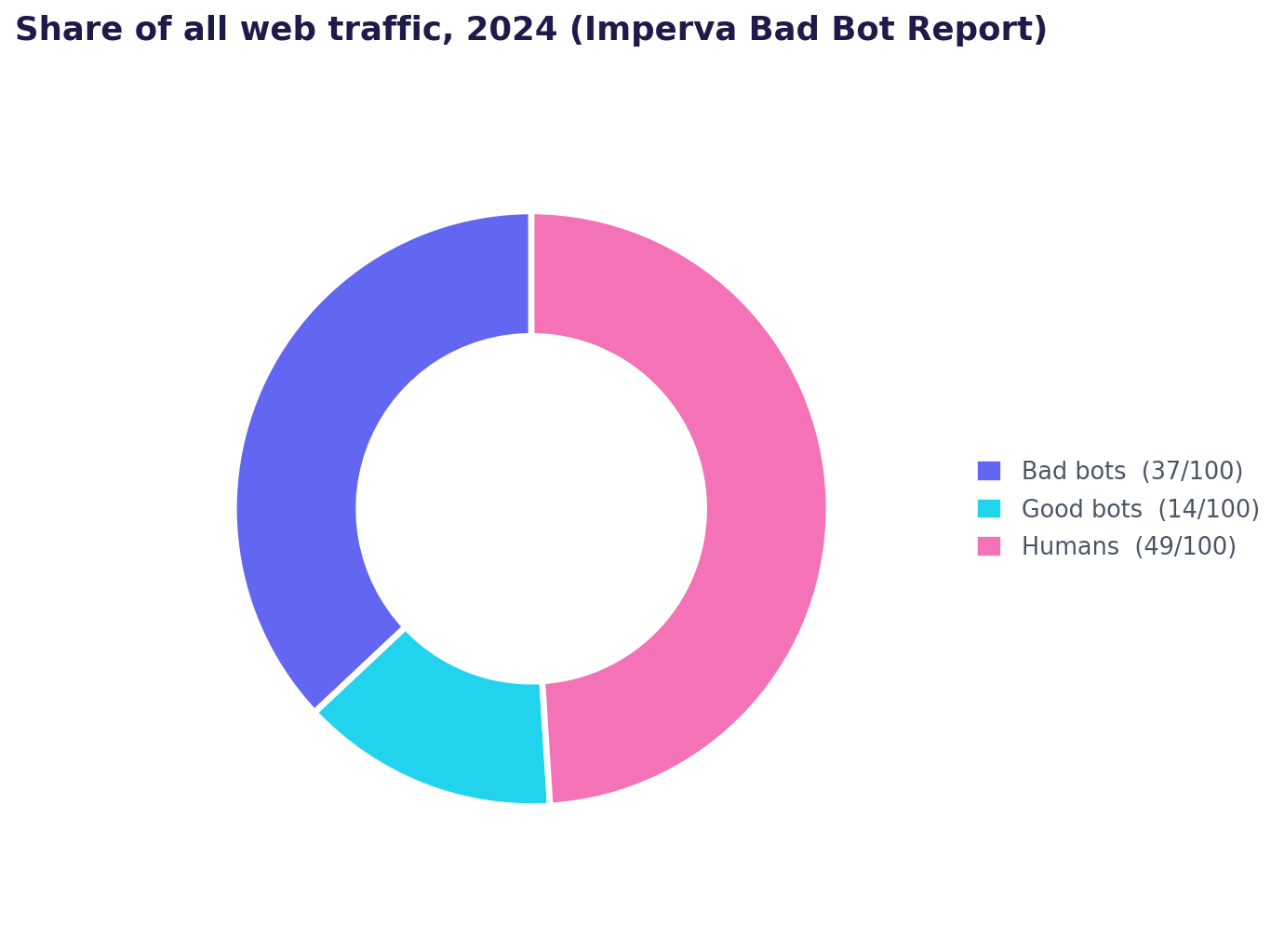
Bots. A startling share of raw web traffic is not human. Imperva's 2025 Bad Bot Report found that automated bot traffic surpassed human traffic for the first time in a decade, at 51% of all web traffic in 2024, with malicious "bad bots" alone making up 37% (Imperva / Thales). Every analytics tool tries to filter bots out, but they use different filters, so two tools looking at the same site throw away different visits and land on different human counts.
How they identify a visitor. Some tools lean on cookies, some on a first-party ID, some on a privacy-friendly daily hash with no cookie at all. Each method counts returning visitors differently, so the same person can be one visitor in one tool and three in another.
The time window. "Unique this week" and "unique this month" are different numbers, and tools draw the boundaries of a session and a day in slightly different ways, especially around midnight and time zones.
Who gets blocked. Trackers get blocked at different rates, so a tool that visitors block more often simply sees fewer of them. This is the same undercount covered in how to track visitors, and it lands unevenly across tools.
The practical takeaway: pick one tool, trust its trend, and stop trying to reconcile two counts to the exact visitor. They were never going to match.
The honest limit
All of this is still counting. Even a perfectly deduplicated unique-visitor number tells you how many browsers showed up, not who they were or what any one of them did. A visitor tracker shows you the dials; it does not hand you the individual behind them.
For a founder trying to turn early traffic into paying users, that per-person view is the one that changes what you do next. It starts with tracking one visitor's path instead of the crowd's.
Counting unique visitors tells you how many browsers showed up, never who they were. ScoutVibe gives you a link per person or per community and shows the path each visitor actually took. The free tier covers your next launch.
Try ScoutVibeFAQ
How do I count unique visitors in Google Analytics?
Look at the Users metric, not a metric called "unique visitors," which GA4 does not have. Active users, shown by default, is Google's count of unique users who engaged with your site in the selected period; Total users counts everyone who triggered any event and runs slightly higher. Both are the modern name for what Universal Analytics called unique visitors.
What is the difference between new and returning visitors?
A new user is a browser Google Analytics is seeing for the first time; a returning user is one it has recorded before in that browser. New users rising after a launch means you reached fresh people, while returning users mean people come back. Remember that "new" means an unrecognised browser, so clearing cookies or switching devices makes the same person count as new again.
Why do two analytics tools never agree on my visitor count?
Because they make different choices about four things: how aggressively they filter out bots (which Imperva says are now over half of all web traffic), how they identify a returning visitor (cookie versus first-party ID versus hash), how they draw time-window and session boundaries, and how often each one gets blocked. All of these shift the count, so two tools on the same site will disagree by design. Pick one and follow its trend.