
What a web page visitor tracker actually shows you
A web page visitor tracker does one job: it turns raw, invisible traffic into a handful of readable views. On its own, a visit leaves no trace you can read. A tracker records each one and then sorts them into a few simple questions you can actually answer: how many people came, where they came from, what they were using, and what they looked at. That is the whole value. It does not think for you, but it replaces guessing with counting.
Once you have installed a tracker, the reports are less mysterious than they look. Most of what follows describes Google Analytics visitor tracking specifically, since that is what most sites run, but the categories are the same in any tool. Heavier product-analytics tools sit at the other end of the spectrum, and what Mixpanel costs shows how their event-based pricing scales. Almost everything a tracker shows falls into one of six buckets.
The six things you actually get
How many. The headline number: visitors and sessions over a period, new versus returning. This is the pulse, the thing you check to see if a launch moved anything.
Where they came from. Each visit is labelled with a source and medium, so you can see that forty people came from a search engine, eleven from Reddit, five from your newsletter. This is where your UTM tags show up, and where source versus medium starts to matter.
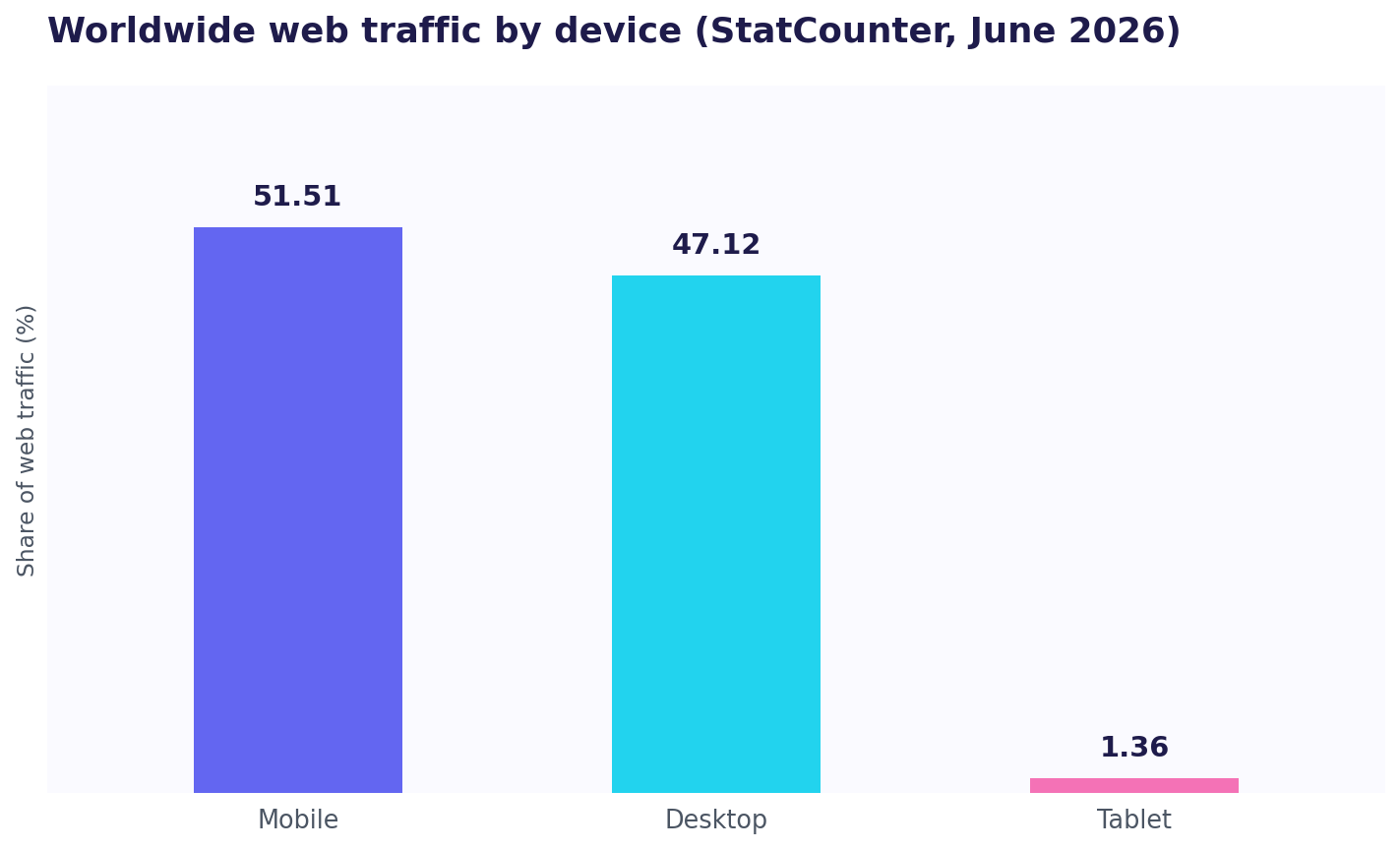
What device they used. Phone, laptop, tablet, plus browser and operating system. This one surprises founders more than any other, because the split is rarely what they assume. Globally, mobile has edged past desktop for web traffic: StatCounter put it at 51.51% mobile against 47.12% desktop in June 2026 (StatCounter). Your own site may skew either way, but if you have never checked, the tracker is where you find out whether half your visitors are pinching-to-zoom on a layout you only ever tested on a laptop.
Where in the world. Country, region, and often city, inferred from the visitor's network. Enough to tell you your traffic is mostly American, or that a surprising slice is coming from one country you never marketed to.
Which pages. Your most-visited pages, the ones people enter on, and the ones they leave from. This is how you learn that your pricing page gets a tenth of the traffic your blog does, or that everyone lands on one post and never goes deeper.
How engaged they were. Time on page, scroll depth, and specific events like a button click or a form submission, if you set those up. (Setting up click tracking is its own small task.) This is the softest data and the easiest to over-read, but it hints at whether people are reading or bouncing.
Can you see what one specific visitor did?
This is the question everyone eventually asks, and the honest answer is: barely, and not in the way you want.
Google Analytics does have a report, User Explorer, that shows a stream of events for one pseudonymous user: this ID viewed these pages, in this order, fired these events. So in a narrow technical sense you can watch a single visitor's activity. But that ID is a random identifier tied to a browser, not a person. You cannot see who it is, you cannot reliably follow them across devices, and the report is not built for answering "did the founder I emailed actually read my pricing page." It is a debugging tool wearing the costume of the answer you want.
So google analytics track user is real but shallow: an anonymous stream of events, not a named person with a story.
What a visitor tracker cannot tell you
Everything above is aggregate. It counts, groups, and averages. What it does not give you is the individual with a name attached: which specific person visited, the full path that one human took across visits, and above all why they left without signing up. A visitor tracker is a very good set of dials. It is not a story about a particular customer. If you are weighing which tool to start with, we compared the best web visitor tracking tools side by side. That is by design: most analytics is anonymous by default, which is exactly what the privacy-first tools in the best Plausible alternatives are built around.
For a founder trying to turn early traffic into the first paying users, that per-person story is usually the missing piece, and it is a different kind of tool from a counter.
A visitor tracker is a good set of dials. It will not tell you which specific person visited or the path they took. ScoutVibe gives you a link per person or per community and shows exactly what each visitor did after landing. The free tier covers your next launch.
Try ScoutVibeFAQ
What information does a website visitor tracker actually capture?
Roughly six categories: how many people visited (sessions and users), where they came from (source, medium, channel), what device and browser they used, where in the world they are, which pages they viewed, and how engaged they were (time, scroll, clicks). Together those answer "how many, from where, on what, looking at what," which is most of what you need to spot whether something is working.
Can I see what one specific visitor did?
Only in a limited, anonymous way. Google Analytics 4 has a User Explorer report that shows the event stream for a single pseudonymous ID, but that ID is a browser, not a named person, it does not reliably span devices, and it is really a debugging tool. It will not tell you that a particular customer you know read your pricing page twice.
What can a visitor tracker not tell me?
The individual behind the numbers. It gives you counts, groups, and averages, but not the identity of a specific visitor, the complete path one known person took over time, or the reason someone left without converting. Those questions need per-person tracking, which is a different tool from an aggregate visitor counter.