
What tracking visitors actually means
To track visitors on your website is simpler than it sounds. You do not build anything. You install a small piece of code, or point a tool at logs your server already keeps, and from then on every visit gets recorded: how many people came, roughly where they came from, and which pages they looked at. The tool does the work. Your job is a one-time setup and then reading the reports.
If you have never done it, the whole thing is one snippet of code pasted into your site, or a plugin if you are on something like WordPress. That is the entire barrier. Everything else in this guide is about understanding what you are actually looking at once the numbers start arriving, because the counts are less literal than they first appear. (For a tour of exactly what a visitor tracker shows you, see the companion guide.)
The two ways it is done
There are really only two methods underneath every analytics tool.
The modern default is a JavaScript tag. You drop one line of code on every page. When someone loads a page, that code quietly runs, stores a small file in their browser, and sends a note back to your analytics tool: someone viewed this page, from this source, at this time. Google Analytics works this way, and so does nearly every alternative. Setup is a copy-paste.
The older method is reading server logs. Every web server already writes down each request it receives, so one approach is to skip the browser code entirely and analyse those logs directly. This is what the original Urchin software did, back before tagging every page was standard, and it is still used where privacy or accuracy matters, because it does not depend on the visitor's browser cooperating.
For a founder doing online visitors tracking for the first time, the practical answer is the first method: pick one analytics tool, paste its snippet, and you are tracking. Which tool is a separate decision; the mechanics are the same.
How a tracker tells visitors apart
Once visits are recording, the obvious question is how the tool knows a returning visitor from a brand new one. The answer, for JavaScript tracking, is the cookie.
A cookie is a tiny file the tool stores in the visitor's browser with a random ID inside it. Next time that browser loads your site, it hands the file back, and the tool recognises the ID: same visitor as before. That is the whole trick behind "new versus returning" counts.
Here is the honest catch, and it matters for how much you trust the numbers. A cookie identifies a *browser*, not a *person*. The same human on their phone and their laptop is two visitors as far as the tool is concerned. And anyone who blocks trackers, uses a privacy browser, or clears their cookies simply is not counted, or gets counted fresh each time.
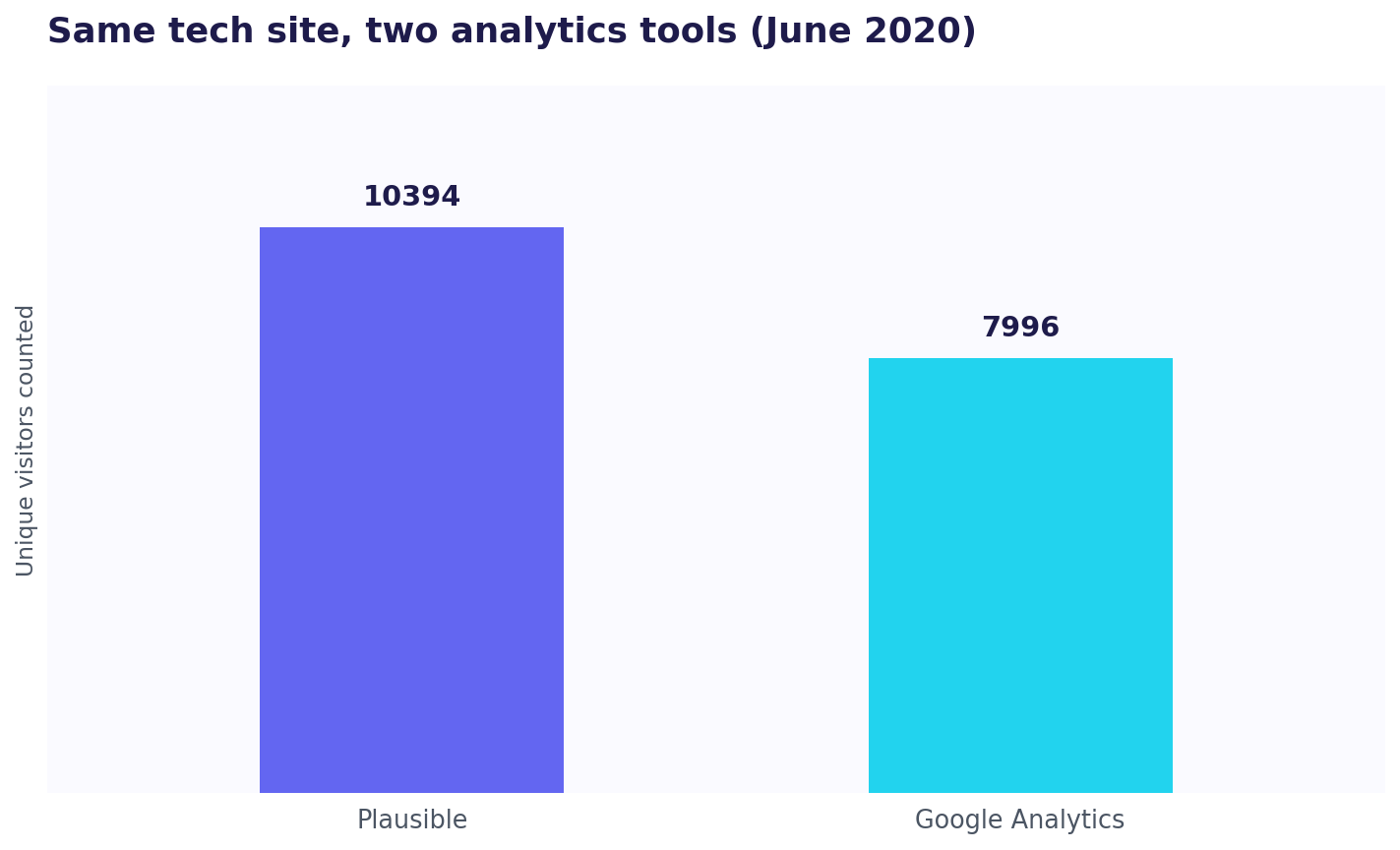
That gap is bigger than most people expect. When the founder of the analytics tool Plausible ran Google Analytics and a second tool side by side on his own sites and compared the counts, the share of visitors missing from Google Analytics ranged from about 6% on a lifestyle site to 26% on a tech-focused one (Marko Saric). It is a first-party measurement from someone who sells a competing tool, so read it as illustrative rather than a universal figure, but the direction is not in doubt: a chunk of your real visitors, larger for technical audiences, never shows up at all. So treat your visitor numbers as a solid estimate of the trend, not a literal headcount. They are directionally true, not precise.
What a "unique visitor" is, and what Google calls it now
You will see the phrase "unique visitors" everywhere, and it has a simple meaning: one browser, counted once in a given period, no matter how many times it stops by. Ten visits from the same laptop in a week is one unique visitor for that week.
There is a catch worth knowing if you use Google Analytics. GA4 does not actually have a metric called "unique visitors." That was the term in the old Universal Analytics, the version Google retired in 2023. In GA4 the equivalent is Active users, which Google defines as "the number of unique users who engaged with your site or app." Engaged, in Google's own words, means "a session that lasted 10 seconds or longer, or had 1 or more conversion events or 2 or more page or screen views." So if you go hunting for "unique visitors" in GA4 and cannot find it, you are looking for Active users. It is the same idea under a newer name. (And if two tools ever show you wildly different visitor counts, that is expected, not a bug.)
The honest limit
Every method here counts visitors in aggregate. How many showed up, roughly where from, which pages they viewed. That is genuinely useful for spotting what is working. If you want a side-by-side of the tools that do this counting, see our roundup of the best web visitor tracking tools. What it does not give you is the individual: which specific person visited, and the exact path they took through your site before they left or signed up.
For a founder trying to turn early traffic into the first paying users, that per-person view is usually the one that decides the next move, and it is a different tool from a visitor counter. Following that path across the full arc, from first touch to purchase, is its own discipline: see our practical guide to customer journey tracking. And if you are doing this solo, we picked the best link tracking tools for solo founders separately. For the full picture, this article is the short version of our complete guide to web visitor tracking.
Counting visitors tells you how many showed up and from where. It will not tell you which person, or the path they took through your site. ScoutVibe gives you a link per person or per community and shows exactly what each visitor did after landing. The free tier covers your next launch.
Try ScoutVibeFAQ
What does it actually mean to track visitors on my website, and how do I start?
It means installing an analytics tool that records each visit so you can see how many people came, from where, and which pages they saw. You start by pasting one snippet of code onto your pages, or adding a plugin if you use something like WordPress. You are not building a tracker, you are installing one, and the setup is a one-time copy-paste.
How does a visitor tracker tell one person from another?
With a cookie: a small file the tool stores in the visitor's browser holding a random ID, so the next visit from that browser is recognised as the same one. The important limit is that this identifies a browser, not a person, so the same human on two devices counts as two visitors, and anyone blocking trackers or clearing cookies is undercounted. The numbers are a reliable trend, not an exact headcount.
What is a unique visitor, and does Google Analytics even use that term?
A unique visitor is one browser counted a single time within a period, however many visits it makes. Google Analytics 4 does not use the exact phrase "unique visitors," though; that was a Universal Analytics term. GA4 calls it Active users, defined as the number of unique users who engaged with your site, where an engaged session lasts at least 10 seconds or includes a conversion or two or more pageviews.