
Web visitor tracking is how you turn a website that quietly receives traffic into one you actually understand. Done well, it answers the questions every founder and marketer eventually asks: how many people came, where they came from, what they did once they arrived, and whether any of it turned into a customer. Done badly, or not at all, you are shipping changes and running campaigns on a hunch.
This is the complete guide. It covers what web visitor tracking is, what you can and cannot see, how the mechanics actually work, why your visitor numbers are less reliable than they look, what the law requires, how to choose tools, and how to set it up without drowning in dashboards. It is long because the topic is genuinely broad, so treat it as a reference: read it through once, then come back to the section you need. Wherever a piece deserves its own deep dive, we link to a focused guide so this page stays readable.
What web visitor tracking actually is
Web visitor tracking is the practice of recording what happens on your website: which pages get viewed, where visitors arrive from, what devices they use, how long they stay, and which actions they take. At its simplest it is a running count of pageviews. At its most useful it is a connected story of behavior you can act on.
It helps to separate three things that often get lumped together:
- Web analytics counts and groups traffic in aggregate: sessions, pageviews, sources, and conversions across everyone. This is what Google Analytics and its alternatives do.
- Behavior tools show you what people do on the page: session recordings, heatmaps, and where they hesitate or give up.
- Per-person tracking ties activity to a specific known individual rather than an anonymous crowd, so you can see the path one particular visitor took.
Most teams start with the first, add the second when they want to see friction, and reach for the third when the individual, not the average, is what decides their next move. We cover all three below, because "web visitor tracking" honestly means all of them. If you want the quick, practical version first, how to track website visitors is the short companion to this guide.
Why it matters more than the dashboard suggests
The reason to track visitors is not to admire a traffic chart. It is to find the specific place where your funnel leaks and fix it, and the gap between "traffic is up" and "revenue is up" is where most of the money hides.
Consider where visitors quietly disappear. The Baymard Institute puts the average documented online shopping cart abandonment rate at 70.22 percent, calculated across 50 separate studies. Seven in ten started-but-unfinished purchases is not an anomaly, it is the norm, and its top causes are friction rather than disinterest: unexpected costs, a forced account, a checkout that felt long or untrustworthy. Every one of those is a moment on a real visitor's path, and none of them shows up in a headline pageview number. Visitor tracking is how you find which moment is costing you.
The journey is also longer and messier than a single visit. McKinsey's research on the consumer decision journey, drawn from the purchase decisions of roughly 20,000 consumers across five industries and three continents, replaced the old linear funnel with a loop of four phases: initial consideration, active evaluation, purchase, and post-purchase. Its central finding is that brands in a buyer's initial consideration set are more than twice as likely to be purchased as brands added later, which means the first touch matters far more than most teams treat it. And people rarely travel that journey in one channel: Salesforce's State of the Connected Customer research reports that 67 percent of customers use multiple channels to complete a single transaction. A visitor who reads a blog post today, returns from an email in three days, and converts from a search next week is one person and one journey, and only tracking that stitches those visits together tells you the truth about what worked. Following that whole arc is its own discipline, which we cover in the customer journey tracking guide.
Your visitor numbers lie more than you think
Before trusting any tracking tool, you have to accept an uncomfortable fact: the raw numbers overstate real humans, often badly. Two forces are responsible, and both are large.
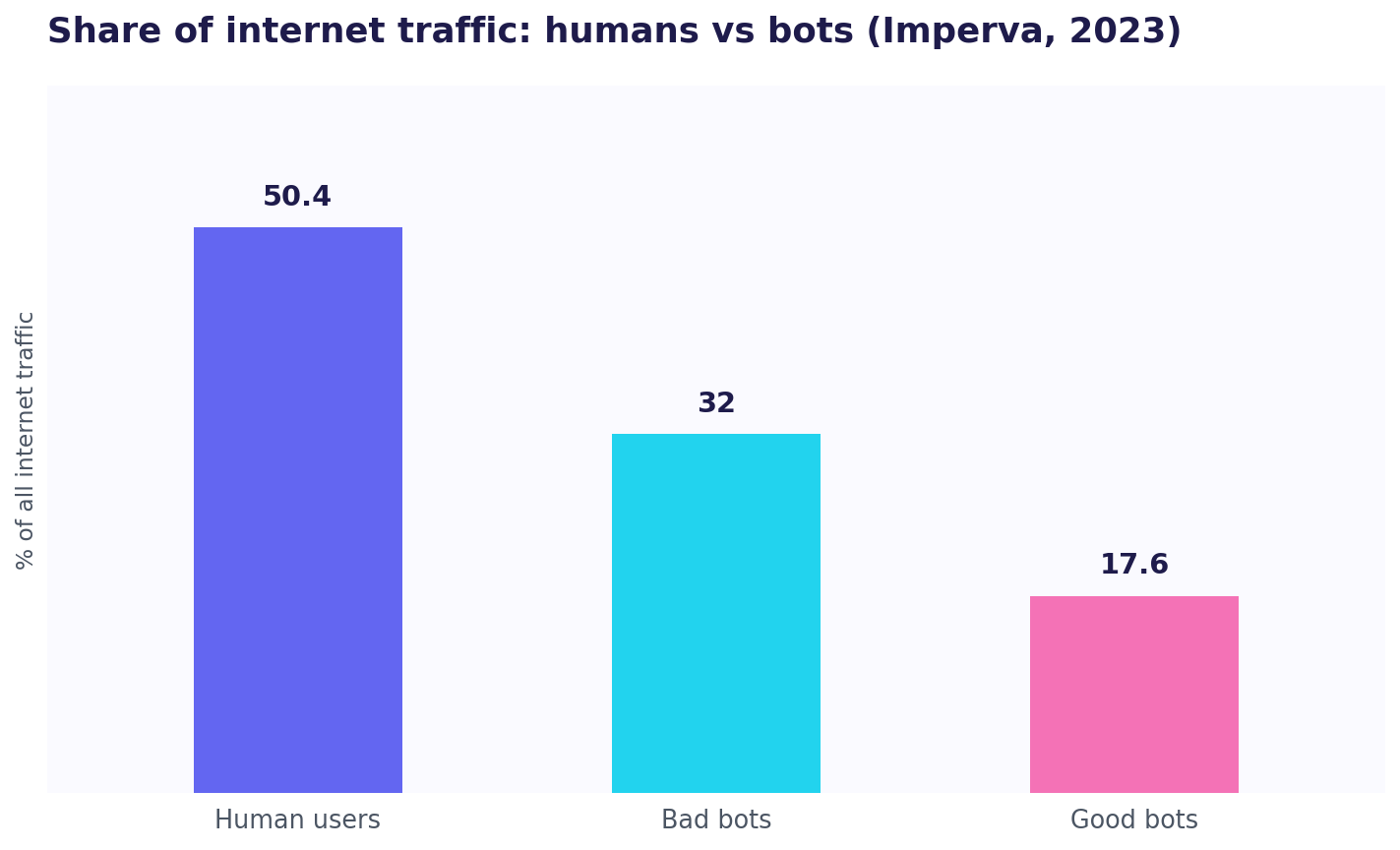
The first is bots. According to Imperva's 2024 Bad Bot Report, bots made up 49.6 percent of all internet traffic in 2023, the highest level since Imperva began measuring in 2013, split into 32 percent bad bots and the rest automated-but-benign crawlers. Human traffic was just 50.4 percent. In other words, nearly half of what hits a typical site is not a person at all. Good analytics tools filter known bots, but no filter is perfect, so a slice of your "visitors" were never candidates to buy anything.
The second is measurement loss at the visitor's end. Roughly a third of internet users run ad blockers, around 32.5 percent by DataReportal's widely cited global digital reports, and many of those blockers also stop analytics scripts from loading. Add browsers that block third-party cookies by default and privacy modes that clear state between visits, and a meaningful share of real humans are never counted at all. The practical takeaway is not to despair, it is to stop treating any single number as ground truth. Watch trends over time in one tool you trust rather than obsessing over whether two tools agree on an exact figure, because they never will. We dig into this in how to count unique visitors, where the same site can legitimately show wildly different counts in different tools.
The two questions: the crowd or the person
Almost every decision about visitor tracking comes back to one fork: do you need the aggregate or the individual?
Aggregate tracking answers "how many, from where, doing what," across everyone. It is the right tool for spotting trends, comparing channels, and measuring whether a change moved the needle for the population. It is also, by design, anonymous. Most analytics is anonymous by default, which is a privacy feature, not a bug.
Per-person tracking answers "did this specific person visit, and what did they do." For a founder chasing the first paying customers, that question is often the one that matters, because early growth is one-to-one: you email a prospect, post in a community, send an investor a link, and you want to know whether that individual engaged, not whether traffic rose. The two are complementary, not competing. Aggregate tells you the shape of the crowd; per-person tells you the story of the one visitor you already care about. Knowing which question you are asking prevents the most common tooling mistake, which is buying a crowd tool and expecting it to answer a person question.
What you can actually track
Here is the practical inventory of what web visitor tracking can capture, and what each item is good for.
| What you track | What it tells you | Where it shines |
|---|---|---|
| Pageviews | How many pages were loaded | Spotting popular and dead content |
| Sessions | Grouped visits by one browser | Measuring engagement per visit |
| Unique visitors | Distinct people, roughly | Sizing your real audience |
| Traffic sources | Where visitors came from | Comparing channels and campaigns |
| Device and location | Phone vs desktop, country | Prioritizing where to optimize |
| On-site path | The order of pages one visitor viewed | Finding where journeys break |
| Events and clicks | Specific actions taken | Measuring signups, key buttons |
| The individual | Which known person did all of the above | One-to-one acquisition |
Each row is a different depth. A pageview is a tally; an on-site path is a story; tracking clicks and button presses turns "someone visited" into "someone tried to act." For a fuller walk-through of what a tracker surfaces and where it stops, see what a visitor tracker shows. You do not need every row. You need the ones that answer the question you actually have.
How web visitor tracking works
Under the hood, visitor tracking uses a small number of mechanisms, and knowing them helps you reason about accuracy and privacy.
The JavaScript tag. The dominant method. You add a small script to every page, and when a browser loads the page the script runs, collects details (page URL, referrer, screen size, and so on), and sends them to the analytics service. This is how Google Analytics, Plausible, Fathom, and most tools work. It is easy to install and rich in data, but it misses anyone who blocks scripts and depends on the browser executing JavaScript.
Cookies and identifiers. To recognize a returning browser, tools traditionally set a cookie, a small stored value that lets them tell "same browser as yesterday" from "brand new." This is what powers the "unique visitor" and "returning visitor" numbers. Cookies are increasingly restricted, which is why many modern tools are cookieless.
Server logs. Every request to your server is logged regardless of JavaScript or cookies, so log-based analytics can count traffic that tag-based tools miss, including many bots. It is more accurate for raw counts but far poorer at behavior, since a log line does not know what a human did on the page.
Trackable links and redirects. Instead of, or alongside, on-page tracking, you can put the tracking in the link itself. A trackable link carries campaign tags or points through a redirect that logs the click before forwarding the visitor on. This is how a redirect gets tracked, and it is the foundation of both UTM campaign tracking and per-person links, because the identity or the source is decided at the link, not guessed afterward.
Fingerprinting. Some tools infer a probable identity from a combination of signals, like browser, fonts, and IP, without a cookie. It is more privacy-invasive and legally fraught, and reputable privacy-first tools deliberately avoid it.
Attribution: how a visit gets credited
Tracking a visit is only half the job. The other half is attribution, deciding which source or campaign gets the credit when a visitor eventually converts, often after several visits from several channels.
The simplest model is last-click: whatever brought the final visit gets all the credit. It is easy and it is also misleading, because it ignores the blog post that created awareness and the email that brought them back. Given McKinsey's finding that early consideration drives most purchases, last-click systematically undervalues the top of your funnel. Multi-touch models spread credit across the touchpoints instead, which is fairer and harder to set up.
For a small team, you do not need a sophisticated attribution engine, you need clean inputs. That means tagging every link you share with UTM parameters so each visit's source is recorded rather than guessed, and knowing how to read those tags back in your analytics, which we cover in finding UTM data in Google Analytics. The enemy of attribution is "direct / none," the bucket where untagged visits pile up, often called dark traffic. Every link you fail to tag becomes a visit you cannot credit, so disciplined tagging is worth more to a small team than any attribution model.
First-party versus third-party data
A shift worth understanding: tracking is moving from third-party data toward first-party data, and it changes what is even possible.
Third-party data is collected by someone else, across many sites, usually via third-party cookies, and it powered a lot of ad targeting. Browsers and regulators have steadily dismantled it, which is why third-party cookies are unreliable and fading. First-party data is what you collect directly on your own site, with your own relationship to the visitor. It is more durable, more accurate, and far easier to justify legally, because the visitor is dealing with you, not an invisible network.
The practical implication for visitor tracking is that the future favors what you measure yourself: your own analytics on your own site, your own tagged links, and, for people you have a relationship with, your own per-person links. A tracking strategy built on first-party data ages well; one that leans on third-party cookies is building on sand.
Server-side tracking and where things are heading
Most tracking runs in the browser, but a growing share is moving server-side, where your own server sends events to your analytics instead of the visitor's browser doing it directly. Server-side tracking is more resilient to ad blockers and browser restrictions, gives you more control over what data leaves, and can improve accuracy, at the cost of more setup. You do not need it on day one, but it is the direction the industry is heading, alongside the broader move to cookieless, privacy-first measurement. The throughline of all these changes is the same: less silent collection of strangers, more deliberate, consented, first-party measurement of the people who actually engage with you.
Cookies, cookieless, and why it changed everything
For years, visitor tracking ran on cookies. Then privacy regulation and browser changes made third-party cookies unreliable, and a whole category of cookieless, privacy-first analytics grew up in response. Cookieless tools count visits using privacy-preserving methods that do not store a persistent per-person identifier, which means two things: they usually need no cookie consent banner, and they trade the ability to follow one individual across sessions for a simpler, compliance-friendly setup.
This is the core trade in modern web analytics: aggregate clarity without a banner, versus cross-session individual detail with the legal overhead that follows. Neither is universally right. A content site that just wants clean traffic numbers is well served by cookieless simplicity; a product that must recognize a returning user needs something more. Understanding the trade is what lets you pick without regret, and it is why the market now offers everything from a bare cookieless counter to a full identified-user platform.
Anonymous versus identified tracking
The privacy dividing line is whether your tracking can point to a specific person.
Anonymous tracking, the default for web analytics, records behavior without tying it to an identity. You see that a visitor from Germany on a phone read three pages, but not who they were. This keeps you clear of most personal-data rules and is enough for the majority of decisions.
Identified tracking connects activity to a known person, usually because they logged in, or because you issued them a link meant only for them. This is powerful and also a responsibility: the moment you can name the person, you are handling personal data and owe them transparency and, where required, consent. The cleanest way to do identified tracking ethically is with consent and with a unique link per person, where the individual you are tracking is someone you already have a relationship with, a prospect you are talking to or a subscriber who opted in, not an anonymous member of the public.
The metrics, decoded
Visitor-tracking dashboards are full of terms that sound obvious and are not. A few worth pinning down:
Unique visitors versus active users. "Unique visitors" is an estimate of distinct people, usually via cookies, and it is inherently fuzzy: clear your cookies or switch devices and you are counted twice. Google Analytics 4 stopped reporting classic unique visitors and uses "Active users" instead, a related but not identical metric, which is one reason finding the right number in Google Analytics confuses people migrating from the old version.
Sessions. A session groups one browser's activity within a time window. Leave a tab idle and return, and you may start a new session, so session counts overstate distinct visits somewhat.
Bounce and engagement. A "bounce" traditionally meant a single-page visit with no further action, though GA4 reframed this around engagement time. A high bounce is not automatically bad, a visitor who got their answer on one page bounced happily.
Why two tools never agree. Every tool defines a session, filters bots, and handles blocked scripts a little differently, so two accurate tools routinely differ by 10 to 20 percent on the same site. This is expected, not a bug. Pick one tool as your source of truth and judge changes by its own trend.
Track mobile-first, and mind the cross-device gap
Where your visitors are matters for how you track them. Worldwide, StatCounter puts mobile at 49.36 percent and desktop at 49.11 percent of web traffic, with tablets making up the small remainder, so for most sites roughly half of visitors arrive on a phone.
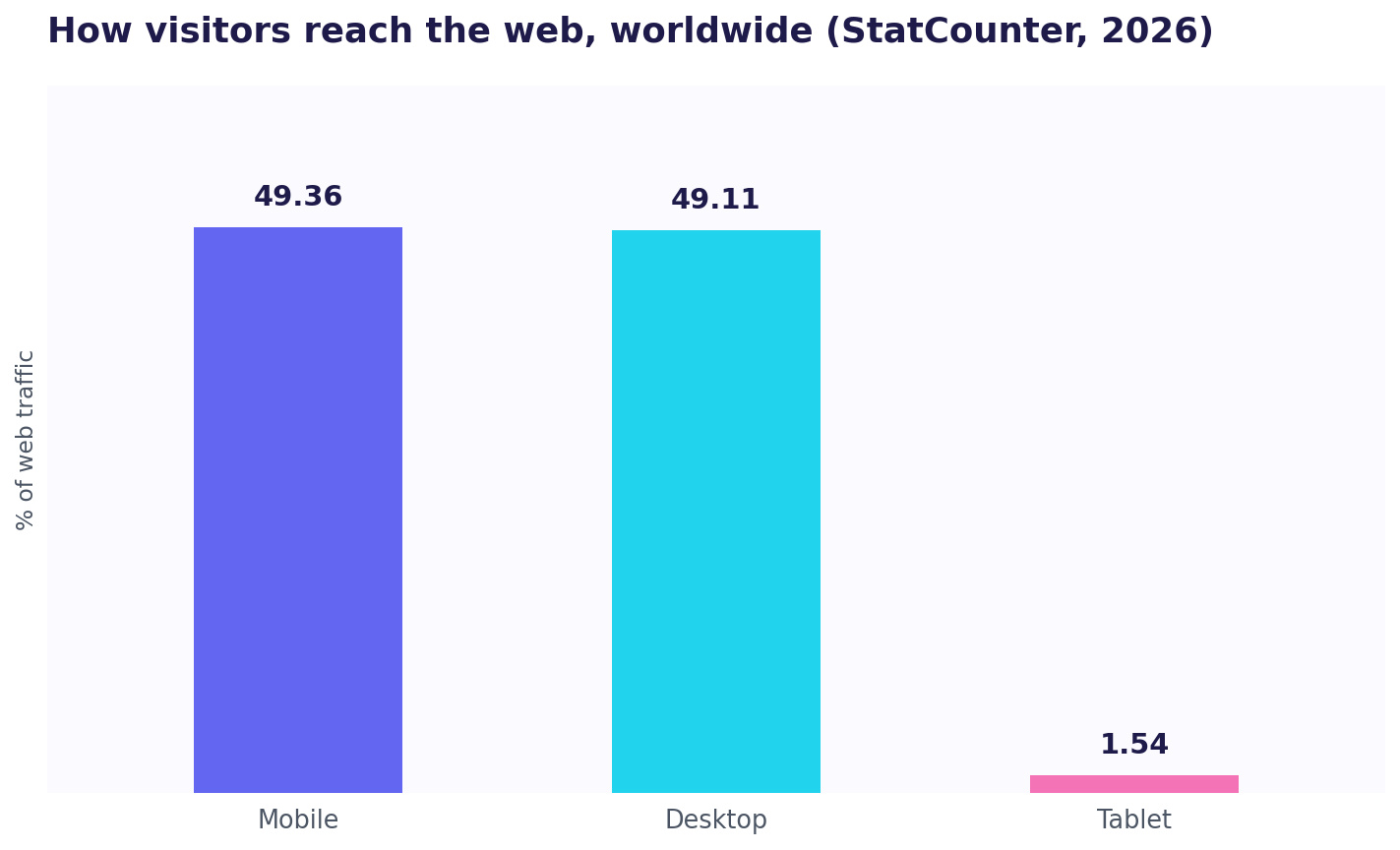
That has two consequences. First, whatever you track has to work and read well on mobile. Second, the same human often visits on a phone, then a laptop, and standard tracking treats those as two different visitors, because the cookie or identifier lives on one device. This cross-device gap is one more reason aggregate unique-visitor counts are estimates, and one more argument for per-person links when you genuinely need to follow one individual across their real, multi-device journey.
Privacy, consent, and the law
Web visitor tracking is regulated, and the rules are not optional. The two you will meet most are the GDPR in Europe and similar frameworks elsewhere, plus the ePrivacy rules that govern cookies specifically.
The practical shape of it: if your tracking stores or reads information on a visitor's device that is not strictly necessary, which classic cookies are, you generally need informed consent first, which is why cookie banners exist. If your tracking collects personal data, you owe transparency about what and why, and you must honor rights like access and deletion. This is exactly why cookieless, privacy-first analytics became popular, they are designed to avoid both triggers, so many of them need no banner at all.
None of this means tracking is hostile to visitors. It means you should collect what you need, be honest about it, prefer privacy-preserving methods when they suffice, and get consent when the law asks for it. A visitor-respecting setup is also usually a simpler one, and simpler setups break less.
This guide explains how tracking and its rules generally work; it is not legal advice. Privacy law varies by country and by how you configure your tools, so confirm your specific setup against your jurisdiction, or with a professional, before you rely on it.
The approaches you can choose from
Putting the mechanics together, there are a handful of distinct approaches, and most mature setups combine two or three:
- General web analytics. A tag-based tool for aggregate traffic, sources, and conversions. The baseline nearly everyone runs. Google Analytics 4 dominates here: W3Techs finds it on 47.6 percent of all websites and on 83.2 percent of sites whose analytics tool is known, so it is the default, though far from the only option.
- Privacy-first analytics. Cookieless, banner-free tools for teams that want the essentials without the compliance overhead.
- Behavior and session replay. Recordings and heatmaps that show what analytics numbers cannot: the actual on-page experience.
- Link and campaign tracking. UTM tags and trackable links that tell you which channel or campaign sent a visit, independent of any on-page tool.
- Per-person tracking. A link issued to a known individual, so their whole visit ties back to them.
How to choose your tools
The choice follows from the questions you need answered and how much you can spend. If you want aggregate traffic for free, the default tools cover it. If you want simplicity and no cookie banner, the privacy-first camp is the answer. If you want to watch behavior, a free session-replay tool complements a numbers tool. And if you want to know which specific person visited, you need a per-person tool, which is a different category entirely.
Rather than repeat every option here, we compared the field in depth in the best web visitor tracking tools, which lines up the general-purpose choices side by side with honest pricing and limits. The short version for a small team: start with one free aggregate tool, add a free behavior tool when you want to see friction, and add per-person tracking for the specific people you are personally chasing.
Setting up visitor tracking without drowning
A tracking setup is only useful if you actually read it, so resist the urge to install everything. A sane order:
- Install one analytics tool on every page and confirm it records a test visit. This gives you traffic, sources, and devices.
- Tag your links. Put UTM parameters on every link you share so the source of each visit is recorded, not guessed. This is the single highest-leverage habit in visitor tracking and it costs nothing.
- Define two or three key events, the actions that mean progress: a signup, a demo request, a purchase. Everything else is context until these are covered.
- Pick one core funnel and watch where it leaks. First visit to signup, or signup to activation. One well-chosen funnel beats a dashboard nobody opens.
- Add depth only when you have a question. Session replay when you suspect a page confuses people; per-person links when you need to know which individual engaged.
That is a setup a team of one can maintain, and it will teach you more than a wall of metrics you never look at.
Common mistakes to avoid
Trusting the raw count. As we saw, bots and blockers make the headline number an overstatement. Judge trends, not absolutes.
Tracking channels but not people. Knowing 40 percent of traffic came from one source is useful; knowing which specific interested person went quiet, and where, is what you can act on this week.
Installing analytics and calling it done. A pageview tool counts. It does not, on its own, tell you why a visitor left or which person they were. Match the tool to the question.
Ignoring consent. A missing or broken cookie banner is a legal risk and, increasingly, a trust one. Handle it deliberately, or choose tools that do not need it.
Drowning in dashboards. Five metrics you review weekly beat fifty you glance at once a quarter. Depth of attention beats breadth of data.
The missing layer: per-person tracking
Almost everything above is aggregate by design, and for most reporting that is correct. But there is a question aggregate tracking structurally cannot answer: did this one specific person, the prospect you emailed, the investor you pitched, the community member who replied, actually engage, and what did they look at?
This is the gap ScoutVibe was built for. Instead of counting anonymous traffic, it gives a specific person their own link, and when they click, it shows the exact path that individual took through your site, which pages, in what order, and where they stopped. You can even record an ideal path once and watch how each real visit diverges from it. For an early-stage founder whose growth is hand-to-hand rather than paid-at-scale, that per-person view is often the single most decision-useful thing in their entire tracking stack, because it turns "someone from the launch visited" into "the person I have been chasing read pricing twice and left." It does not replace your aggregate analytics; it answers the question your aggregate analytics was never designed to.
From tracking to decisions
Tracking that nobody acts on is just storage. The habit that separates useful tracking from a graveyard of dashboards is a short, regular review: once a week, look at your two or three key numbers and one funnel, and ask a single question, what is the one thing this suggests I change. Then change it and watch the same numbers next week.
The judgment matters as much as the data. Traffic that rose while conversions stayed flat is a prompt to investigate, not to celebrate. A channel that sends visitors who bounce on arrival is one to question, not to scale. A page everyone reaches and everyone leaves is your highest-value fix. The point of every metric in this guide is to shorten the distance between noticing something and doing something about it, and a small, consistent review beats an occasional deep dive into fifty charts you will not remember. This is also where per-person tracking earns its place for an early team: reading five real individual journeys end to end each week teaches you more about why people do and do not convert than any aggregate average can, because the average hides the exact moment a real person hesitated.
Putting it together
Web visitor tracking, done honestly, is a layered practice, not a single tool. Aggregate analytics tells you the shape of your traffic and where it comes from. Behavior tools show you the on-page experience. Link and UTM tracking attribute each visit to its source. And per-person tracking, when you need it, tells you the story of the one visitor who matters most right now. Underneath all of it, remember that the numbers are estimates shaped by bots, blockers, and cross-device reality, so trust trends over absolutes, respect the visitor's privacy, and track the few things that actually change your decisions.
Start small: one analytics tool, tagged links, a couple of key events, one funnel. Add layers only when a real question demands them, and let the tracking grow as your questions do rather than installing everything on day one and reading none of it. That is how a website stops being a black box and starts being something you can genuinely steer, decision by decision, week after week.
A short glossary of visitor-tracking terms
The vocabulary trips people up, so here are the terms you will meet most, in plain language.
| Term | What it means |
|---|---|
| Pageview | One load of one page |
| Session | One browser's activity within a time window |
| Unique visitor | An estimate of one distinct person, usually via a cookie |
| Active users | GA4's replacement for classic unique visitors |
| Bounce | A visit that left without a second action |
| Referrer | The page or source a visit came from |
| UTM parameter | A tag added to a link to record its source |
| Cookieless | Tracking that stores no per-person identifier |
| First-party data | Data you collect directly on your own site |
| Attribution | Deciding which source gets credit for a conversion |
| Per-person link | A unique link issued to one known individual |
A special case worth naming: bio-link pages like Linktree have their own built-in analytics, which count taps on the links but stop at the click. We explain the gap and how to extend it in Linktree analytics explained.
Frequently asked questions
What is web visitor tracking?
Web visitor tracking is recording what happens on your website, how many people visit, where they come from, what devices they use, what pages they view, and what actions they take, so you can understand and improve how your site performs. It ranges from simple aggregate analytics to per-person tracking that follows one specific individual's path.
Is web visitor tracking legal?
Yes, when done properly. You generally need consent before storing non-essential information like classic cookies on a visitor's device, and you must be transparent about any personal data you collect and honor rights like access and deletion. Privacy-first, cookieless tools are designed to avoid many of these triggers. This is general information, not legal advice, so confirm your specific setup for your jurisdiction.
How do websites track visitors?
Most use a small JavaScript tag on each page that records details and sends them to an analytics service, often using cookies to recognize returning browsers. Others use server logs, which count every request, or put tracking in the link itself via campaign tags and redirects. Per-person tools issue a unique link to a known individual so their visit ties back to them.
Why do my visitor numbers differ between tools?
Because every tool defines a session, filters bots, and handles blocked scripts differently, so two accurate tools routinely differ by 10 to 20 percent on the same site. Bots, which make up roughly half of internet traffic, and ad blockers, used by about a third of users, add further noise. Pick one tool as your source of truth and judge changes by its own trend rather than chasing an exact match.
What is the difference between web analytics and visitor tracking?
Web analytics is one part of visitor tracking, the aggregate part, counting traffic, sources, and conversions across everyone. Visitor tracking is the broader term, also covering behavior tools like session replay and per-person tracking that follows a specific individual. In practice, mature setups combine several.
Can I track visitors for free?
Yes. Google Analytics 4 is free, several privacy-first tools have free tiers, session-replay tools like Microsoft Clarity are free, and per-person tools including ScoutVibe offer a free tier. Most small teams can build a capable tracking stack without paying anything.
How do I track which specific person visited my site?
Standard analytics is anonymous and cannot name the individual. To follow a specific person, issue them a unique tracking link, so their identity is set when you hand out the link rather than guessed from an anonymous session afterward. Tools built around per-person links, like ScoutVibe, are designed for exactly this, and it works best with people you already have a relationship with.
Do I still need visitor tracking if I use link tracking?
They answer different halves of the same question. Link tracking tells you a click happened and which channel it came from. Visitor tracking tells you what the person did after they landed. Most teams use both: tag the link to know the source, and track the site to know the outcome.
Every aggregate analytics tool counts the crowd and loses the person. ScoutVibe answers the other question, which specific visitor engaged and what path they took, from a link you gave them. The free tier covers your next launch.
Try ScoutVibe